
Automating, Organizing, and Scaling Your Hustle on Whatsapp.


If you’ve been following this series from the start, your WhatsApp Business should already be doing some heavy lifting for your hustle.
In Part 1, we covered the basics: Setting up WhatsApp Business properly, creating a clean profile and catalog, and making it easy for customers to find and message you.
In Part 2, we focused on growth and sales. How to attract customers, promote your WhatsApp link the right way, and turn everyday chats into actual sales.
Now comes the next challenge.
As inquiries increase and sales pick up, things start getting messy.
Messages pile up, follow-ups get missed, and it becomes hard to keep track of who is new, who has paid, and who needs attention.
That’s where Part 3 comes in.
In this final part of the series, I’ll show you how to use some of the most underrated WhatsApp Business tools to manage the chaos and handle more customers without burning out or adding people to your payroll.
Twende Kazi.
Growth Hack 1. Automate Your First Impressions
Research says it takes less than 10 seconds to make a good first impression.
And on WhatsApp Business, the timer starts the moment a customer hits “Send.” \
Delay responding, and you’re making a bad impression about your customer service.
But what if uko busy na customer mwingine, ama unahandle some other stuff kama deliveries? Or maybe you’re taking a well-earned break?
In such situations, automations kama Greeting and Away Messages zinaeza kusave big time.
With well-set-up Greeting and Away Messages, you can ensure your customers never have to wait minutes or hours for a response.
Let’s talk a bit more about each:
The Greeting Message
This is the automatic reply that your customers get wakikutumia message for the first time ama wakikaa more than 14 days without texting you.
It’s a great way to make sure that your customers aren’t getting crickets when they text you, which could push them right into the hands of your competition.
Here's how to set it up:
-
Open Tools and click on Greeting Message.
-
Turn on the Send Greeting Message feature, then tap Greeting Message to write your greeting. Confirm when done.
-
On the same page, click on Recepients to set who should receive it: everyone, new contacts, selected people, or exclude some.
-
Hit Save.
Feeling stuck? Check the screenshot below:

Kumbuka greeting message inafaa ku-make a good first impression na ku-engage customer.
So instead of a generic “Hi, welcome to (your biz name)” set it to something that’s not only friendly and professional, but also manages expectations and gives the customer something to do while they wait.
Let’s say, for example, uko na clothing biz inaitwa Tasha Threads. Here’s what your greeting message could look like:
“Hello friend! 👋 Welcome to Tasha Threads!
I’m Tasha, and I’m probably helping another customer or packing an order.
For quick help:
• Browse our latest dresses & purses here: [Link to Catalogue]
• Delivery info & prices: [Link to a saved post]
I’ll be with you in a moment!”
See how much better this is than “Hi, welcome to Tasha Threads”?
The Away Message
This is a polite way of saying “Out of Office". It’s an auto-reply that tells customers you’ve seen their message and sets a clear reply time, protecting your personal hours.
Setting it is pretty simple: Go to Tools>Away Message, then toggle that option on.
In the same window, utaona option ya ku-set the away message, kuschedule when it gets sent, as well as who it gets sent to (see screenshot below).

Again, you need to be friendly, set clear expectations, and give them something to do in the meantime.
For Tasha Threads, an away message might look like this:
“Thanks for your message! 😊
I’ve stepped away for the evening to spend time with family, but I’ve seen your message and will get back to you first thing tomorrow morning (by 9 AM). In the meantime, you can view our full collection here: [Link to Catalogue].
Talk soon! – Tasha.”
Growth Hack 2. Use Labels to Organize Your Chats
Ukizitumia poa, Labels (which WhatsApp is gradually renaming to Lists) zinaeza kusave from a lot of the chaos that comes with scaling.
They can help you organize your chats and keep track of every customer, so nothing slips through the cracks.
Kuzicreate ni rahisi, so I won’t go too deep on how. If you need help, check the WhatsApp Help Center.
To give you an idea of what they look like, here’s an image of the Labels user interface.

One of the best ways ya kutumia Labels for organization is to create a visual system that helps you track every customer’s journey.
With such a system, you can see at a glance who needs your attention and what stage they are at.
This is much better than scrolling through a long, messy inbox.
Here’s what that might look like for Tasha Threads:
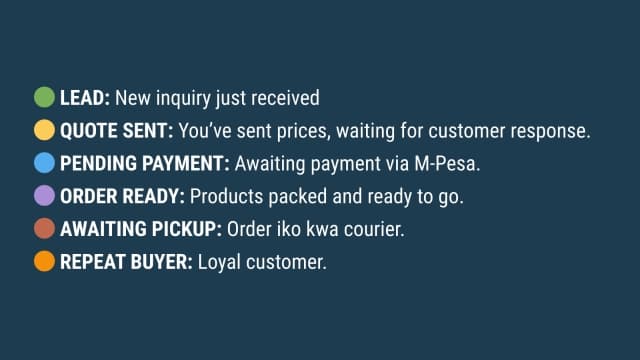
With this setup, Tasha can instantly see what needs attention first.
For example, 🔵 PENDING PAYMENT chats are high-priority. She can send a quick M-Pesa reminder so orders don’t get delayed. Similarly, 🟢 LEAD chats need fast replies to turn inquiries into sales.
Such a system also makes it easy to locate buyers at a specific stage in their journey and send them targeted broadcast messages.
Hii usaidia sana sana time unataka kutuma broadcast messages za vitu ka reminders, promotions, ama new arrivals.
Growth Hack 3: Use Collections to Organize Your Catalog and Boost Sales
For some businesses, growth simply means adding more products to their lineup.
Maybe you started with Ankara dresses only, and over time, you added work dresses, party gowns, handbags, and matching accessories.
Or maybe ulianza na kuuza makeup pekee, but now umeongeza perfumes, wigs, na beauty accessories…You get the point.
When this is what growth looks like, your catalog can start getting messy real quick.
What was once easy to scroll through now turns into a long list of products, and customers have to dig around just to find what they want.
That’s not exactly a great shopping experience.
Such situations ndio collections ukua useful.
Product Collections let you group your products into neat, easy-to-browse sections.
Instead of throwing everything into one big catalog, you guide customers straight to what they’re looking for, and your shop instantly looks more put-together.
Here’s a mock-up of what that might look like for Tasha Threads:

On top of making shopping easier, Collections also help with:
● Targeted promos: Instead ukue unatuma your whole catalog kwa broadcast messages ama or IG posts, you can just share the link to a specific collection.
● Grouping items that go together: You can create collections for things people usually buy together, like a party dress with matching heels and a clutch, or a full makeup set. This is known as product bundling, and it has been proven to increase average order value (I.e. the amount of money a customer spends in one go/shopping experience)
● Looking more professional: Catalog imepangwa gives that “proper business” vibe, not just random product photos in a chat.
WhatsApp Help Center iko na guide fiti ya ku-set up na ku-manage Collections, and it’s so simple that sioni need ya kuirudia hapa. You can find it here.
Just keep in mind that ni must ukue ushaunda catalog yako before you even think about a Collection (We covered how to create a product catalog in [Part 1](Just keep in mind that ni must ukue ushaunda catalog yako before you even think about a Collection (We covered how to create a product catalog in Part 1 of this series, remember?). ) of this series, remember?).
Wrapping It Up: Start Small, Scale Smart
You’ve seen how automations, Labels, and Collections can make your WhatsApp hustle smoother.
But here’s the thing: you don’t need to implement everything at once.
Pick one hack and implement it today. Maybe it’s your Greeting Message, a Label system to track orders, or a Collection for your bestsellers. Get that working perfectly.
Then next week, add the next growth hack. Step by step, your hustle will go from chaotic chats to a clean, efficient, professional operation.
Start small, build momentum, and watch your business scale without burning yourself out.